
Between meetings
Reset quickly after high-context tasks so you can return with steadier attention.
Headphones + 10 minutes
Pick one goal, press start, and begin a 10-minute session in seconds.
Use Cases + Why It Works
Choose where it fits today, then rely on preset-first controls and timer boundaries to keep sessions repeatable.
Reset quickly after high-context tasks so you can return with steadier attention.

Use a short pre-block session to reduce mental noise and start with clearer intent.

Close the workday with a timed wind-down so your bedtime routine starts calmer.
Trusted sources
For details and context, see the research snapshot.
What Early Users Report
Quick, practical feedback from early users running BinauralFlow during real workdays and evenings.
Most mentioned outcome
“I use BinauralFlow for 10 minutes between meetings, and it helps me reset without losing momentum.”
Midday reset between meetings · 10-minute sessions
“The preset + timer flow makes it easy to actually stick with a routine instead of overthinking settings.”
Deep-work start · 12-minute sessions
“The wind-down sessions help me transition out of work mode at night without extra apps.”
Evening transition · 20-minute sessions
Quotes are shared with permission.
Why This Feels Easy
Most tools lose momentum at setup. BinauralFlow keeps the path clear so starting a session feels lightweight.
Choose a proven starting point instead of tuning everything from scratch.
Pick your duration first so the session has a clear start and finish.
Layer ambience and guidance only as needed to keep the session sustainable.
Let auto-stop close the loop so sessions stay easy to repeat daily.
Start Flow
Choose calm, focus, or wind-down based on what you need now.
Select a duration that matches your schedule and current energy.
Adjust ambience and guidance until the mix feels steady, not intense.
Begin at moderate volume and let auto-stop end the session cleanly.
Inside the Studio
See exactly what you use in-session: start state, core controls, and comfort guardrails.
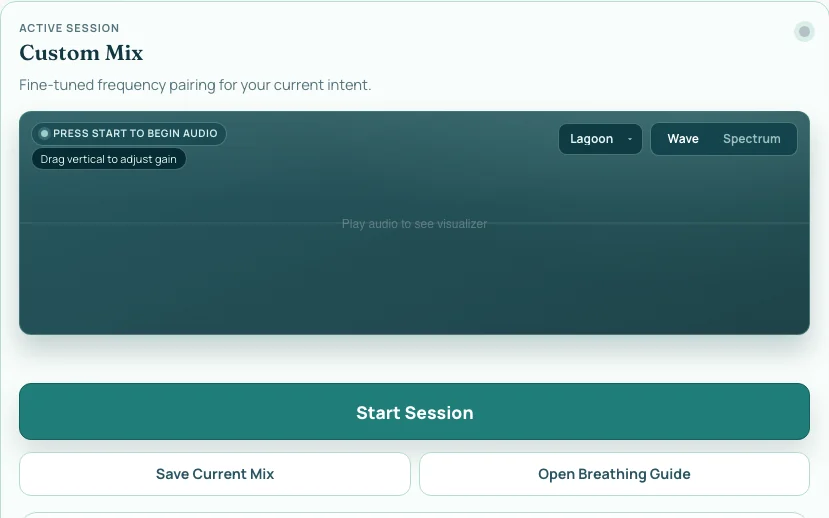
Open directly into a focused session view so you can begin without setup drift.
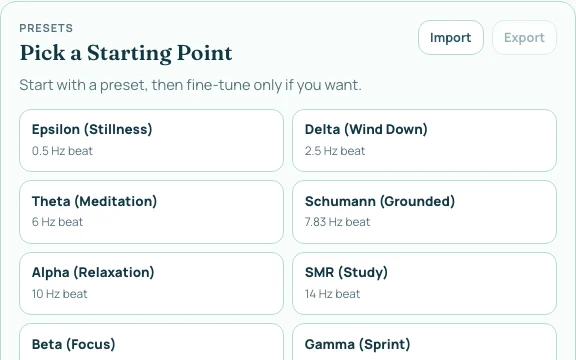
Pick a preset first, then adjust only the controls you actually need.
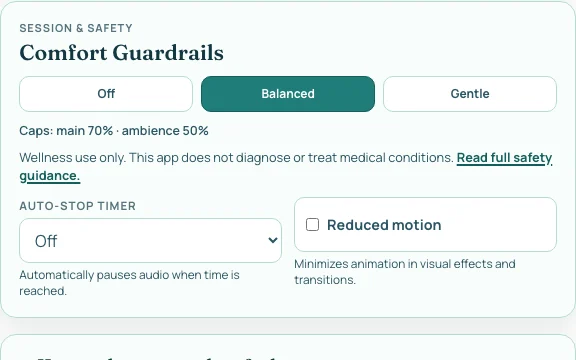
Caps and timer boundaries keep longer-term use more sustainable.